EZcreate
Easily create new Work Orders (including photos and attachments) in the field via email.
Simply send an email from your mobile phone or in-field device, using a concise and structured subject line – EZcreate will do the rest.
When working on-site, field-based technicians or shop floor operators often do not have immediate access to a computer or the time required to log into JDE and navigate its user interface.
As a result, the process of creating new Work Orders in real time can be cumbersome, leading to delays, incomplete records, or reliance on manual follow-up once technicians return to the office.
In an ideal world, technicianswould have a simpler, more accessible method to raise new Work Orders while in the field or on the factory floor.
EZcreate bridges the gap between field operations and enterprise systems by combining the simplicity of email with the structured data requirements of JDE.
EZcreate enables faster Work Order creation, improves data completeness, and supports more efficient maintenance or manufacturing operations without requiring technicians to interact directly with the JDE user interface while in the field.

EZnotes
Automatically attach Media Objects to Work Orders in the field via email.
Record shift handover notes, capture observations, document work performed, and store supporting evidence such as photographs or documents against in-progress Work Orders.
Much of the information appended to Work Orders is generated in the field or on the shop floor, where direct access to the JDE application is often limited or impractical.
Technicians may be working away from a computer or in environments where logging into JDE is not feasible at the time the information is created.
Important contextual information may be delayed or recorded outside the system, reducing its immediate value.
Standard JDE functionality does not provide a simple, field-friendly mechanism for adding Media Object attachments to existing Work Orders without direct interaction with the JDE user interface.
EZnotes enables text and file attachments to be added to existing Work Orders using emails sent from a mobile phone or other in-field device, removing the need for direct access to the JDE application while still ensuring that information is captured promptly.

EZpop
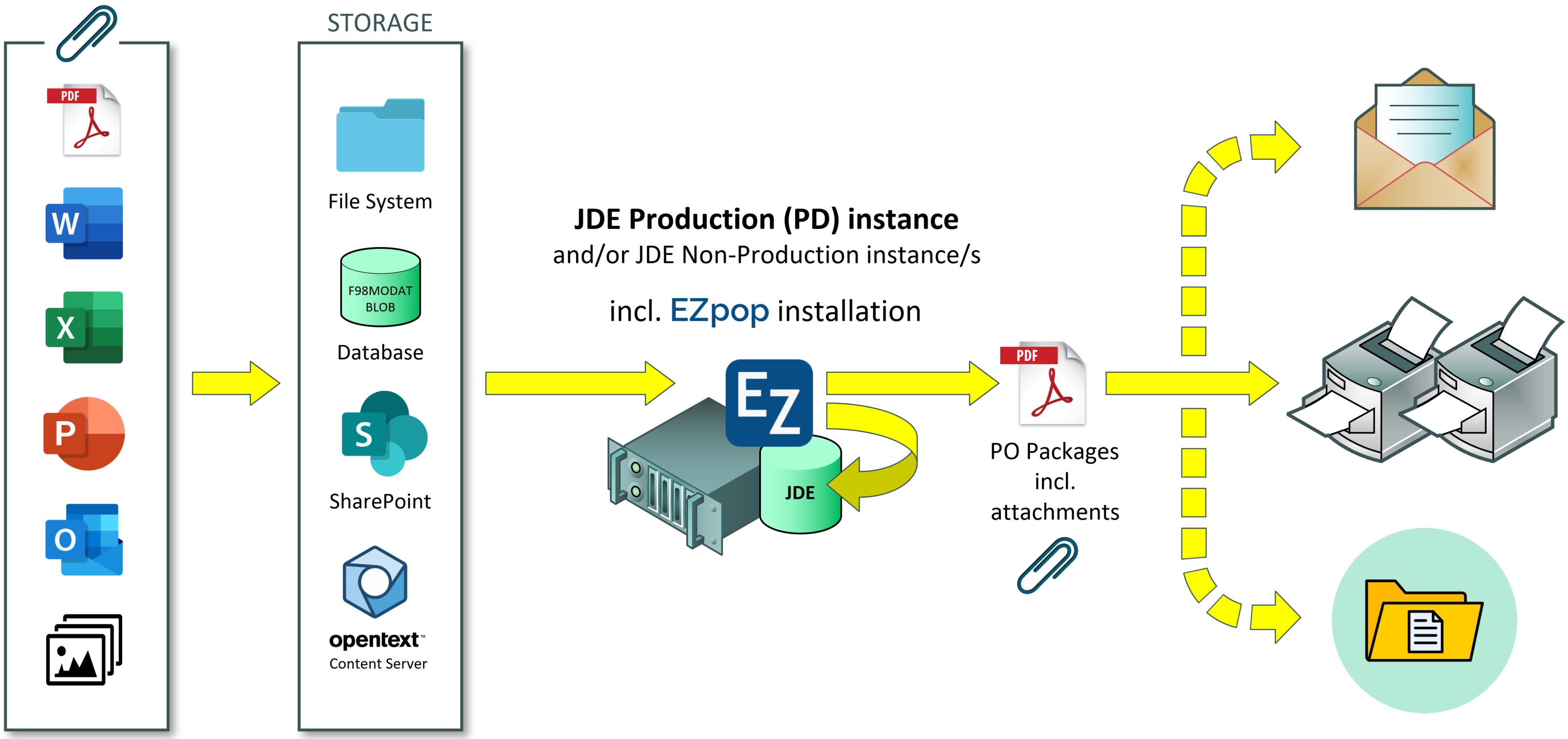
Automatically collate JDE Purchase Orders complete with all associated Media Object attachments into individual PO packages.
Then automatically print or email the finished PO packages to suppliers, or even auto-save to archive as well.
Do you need to include standard documentation with Purchase Orders?
Does each item on your Purchase Orders need to be accompanied by an item-specific specification sheet?
Key information that needs to be provided to suppliers may be attached directly to POs, or even to the items on POs – either way, EZpop can assist by packaging together and distributing POs and associated attachment/s.
EZpop extracts Purchase Order number/s and automatically queries the JDE database for associated Media Object attachments.
EZpop then packages each Purchase Order together with the required attachments, before...
- printing and/or emailing, and
- optionally auto-saving to archive.
EZwop
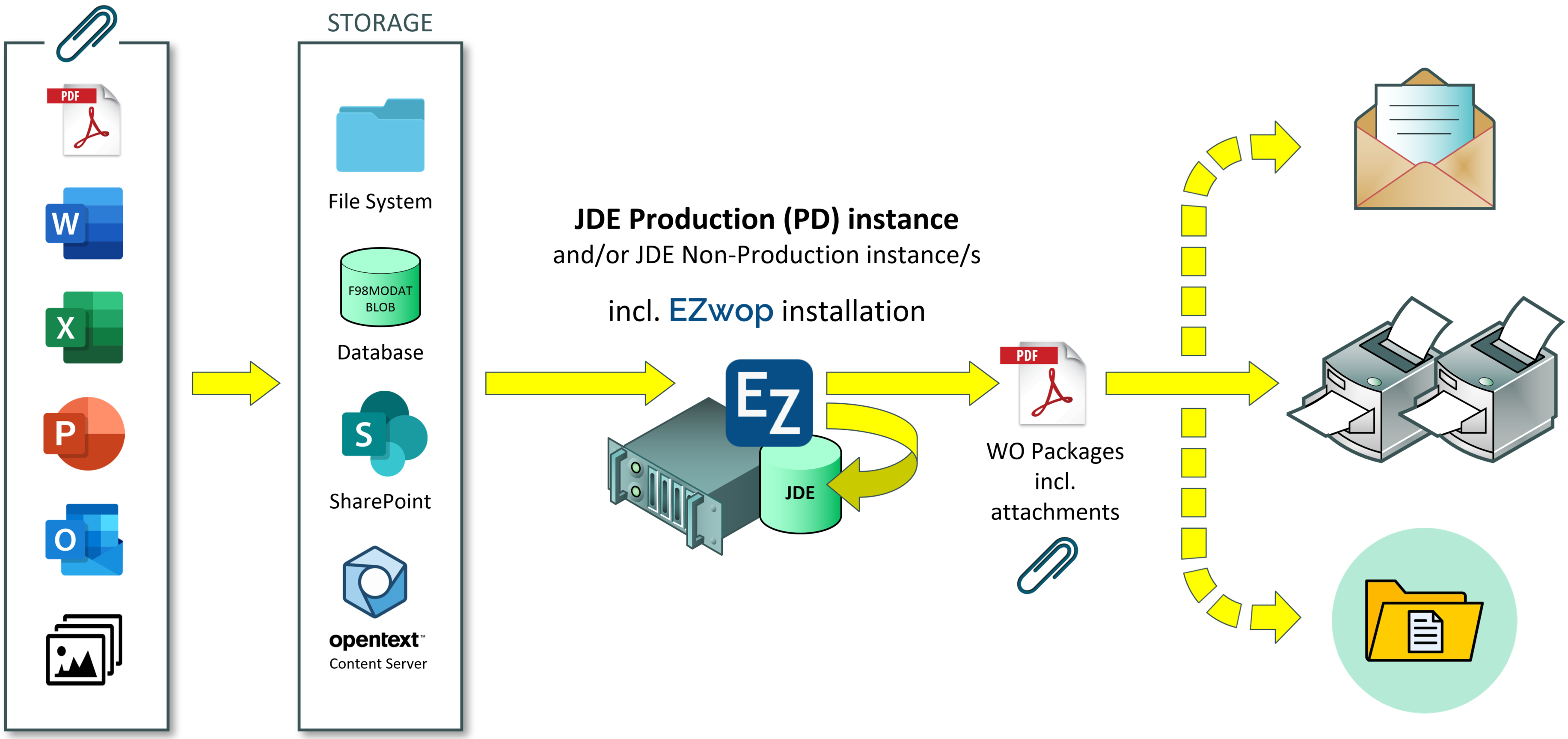
Automatically collate multiple JDE Work Orders complete with all associated Media Object attachments into individual WO packages.
Then automatically print the finished WO packages, or even email or auto-save them as well.
Printing JDE Work Orders can be time consuming and frustrating.
Work smarter than just opening each Work Order one-by-one, printing it, then cycling through attachment-by-attachment opening and printing each using native desktop applications like Word, Excel, Acrobat, etc.
EZwop extracts Work Order number/s and automatically queries the JDE database for associated Media Object attachments.
EZwop then packages each Work Order together with the required attachments, before...
- printing each in order, and
- optionally emailing or auto-saving each,
- without user interaction, and
- without the need for desktop viewer applications.
Frequently Asked Questions
How do EZpop and EZwop work?
In JDE, a file system folder is configured as the output destination for Purchase Order (PO) and Work Order (WO) print-to-PDF jobs.
EZpop and/or EZwop run on the JDE (or other) server as either a Windows Service or a Scheduled Task, or on Linux systems as a Linux daemon, to poll regularly for new Purchase or Work Orders to process.
When a new order is detected, EZpop or EZwop extracts the PO or WO number from the filename and queries the JDE database for related media objects. All associated attachments are appended to the order resulting in a single package ready for subsequent processing.
Finally, the PO or WO packages are printed and optionally may also be auto-emailed and/or archived into an auto-generated folder structure.
How do EZcreate and EZnotes work?
Technicians send emails to a dedicated mailbox for EZcreate and/or EZnotes to process.
The email subject line must be structured to contain a keyword followed by a Work Order (WO) Type and Description (for EZcreate), or by a WO number (EZnotes).
The EZsuite products run on the JDE (or other) server as either a Windows Service or a Scheduled Task, or on Linux systems as a Linux daemon, to poll regularly for new emails to process.
EZnotes generates Text media object/s from the email body (including in-line images), and File media objects from any email attachments, adding them to the relevant WO record in JDE.
EZcreate firstly creates a new WO in JDE and, similarly to EZnotes, generates and adds media objects to the newly created WO.
Why use EZpop or EZwop?
There are a few commercially available Purchase Order and Work Order printing solutions for J.D. Edwards.
Some of these solutions require customisations within JDE to allow extraction of attachments from the JDE database, thus increasing the "technical debt" to be managed when JDE is upgraded.
Others approaches employ "helper" desktop applications installed on the JDE server, but when deployed on more recent server operating systems, Office automation issues are likely with unattended operation.
The workarounds to these issues are sub-optimal.
EZsuite products do not require customisations within JDE nor do they rely on Office automation.
What is Office automation, why is it an issue?
Office automation refers to running Office applications in unattended, non-interactive mode.
Microsoft does not recommend, and does not support, automation of Office applications.
With newer operating systems like Windows Server 2016+, solutions that rely on MS Office desktop applications being installed on the JDE server fail due to these constraints.
A temporary workaround is to leave a user account permanently logged on to the JDE server - poor practice from a security and resource availability perspective.
EZsuite products do not have a dependency on "helper" desktop applications nor on Office automation.
Do I need to configure JDE for EZpop or EZwop?
Your JDE functional specialist may have already built a Report Definition to format your PO or WO print-to-PDF output.
The Report Definition will simply need to specify a standard PO / WO naming pattern, and have a destination file path configured for print output.
Are the EZsuite products secure?
EZsuite products secure sensitive information like passwords for database connection and email credentials using a secure block cipher encryption algorithm.
Similarly, key information within the configuration file of EZsuite products is also secured.
What file types do the EZsuite products support?
EZsuite products process the following file types:
- Adobe PDF
- Microsoft Word
- Microsoft Excel
- Microsoft PowerPoint
- Microsoft Outlook (MSG)
- Rich Text Format (RTF)
- Comma-separated values (CSV)
- Image Files, including BMP, GIF, JPEG, PNG, SVG and TIFF
- Multi-page TIFF
- Any of the above as a database BLOB
- Any of the above as a byte stream from a URL
Are the EZsuite products difficult to install?
Installation is very straight forward...
- Install the appropriate .NET Runtime (if not already deployed)
- Create a programs folder and copy core EZsuite program files to this location
- Modify the program settings file with customer-specific configuration for database, etc.
- Install the Windows Service, Scheduled Task, or Linux daemon
- For EZpop / EZwop...
- Configure JDE Report Definitions
- Setup the printer
- For EZcreate / EZnotes...
- Setup a dedicated mailbox
Which Media Object stores are supported?
EZpop and EZwop can handle Media Objects stored in:
- The file system
- The JDE database as BLOBs
- Microsoft SharePoint
- OpenText Content Server
- URLs on the Internet or your intranet
What JDE versions do the EZsuite products support?
EZwop works with Versions 9.0, 9.1 and 9.2 of J.D. Edwards EnterpriseOne.
Contact
Contact us for more information on EZsuite - Easy utility solutions for J.D. Edwards EnterpriseOne